In the relentless, caffeine-fueled chaos of 2026, your poor, overworked brain is shrieking for mercy under a mountain of tasks. Emails multiply like rabbits, deadlines pounce from the shadows, and that vague mental note to “buy milk” evaporates the instant you step into the store. 😱 But fear not! A squad of task‑conquering titans is waiting to march into your life, snap organization into place, and turn your to‑do list from a screaming banshee into a purring kitten. These apps don’t just manage tasks—they own them, sort them with the flair of a Michelin‑starred chef, and whisper motivational pep talks directly into your productivity cortex.
Forget sticky notes that curl up and die after two days. In the words of every overwhelmed soul, “Why didn’t I download this sooner?!” Let’s dive into seven spectacular to‑do list warriors that are ruling 2026.
TickTick: The Over‑Achiever With a Six‑Pack of Smart Lists
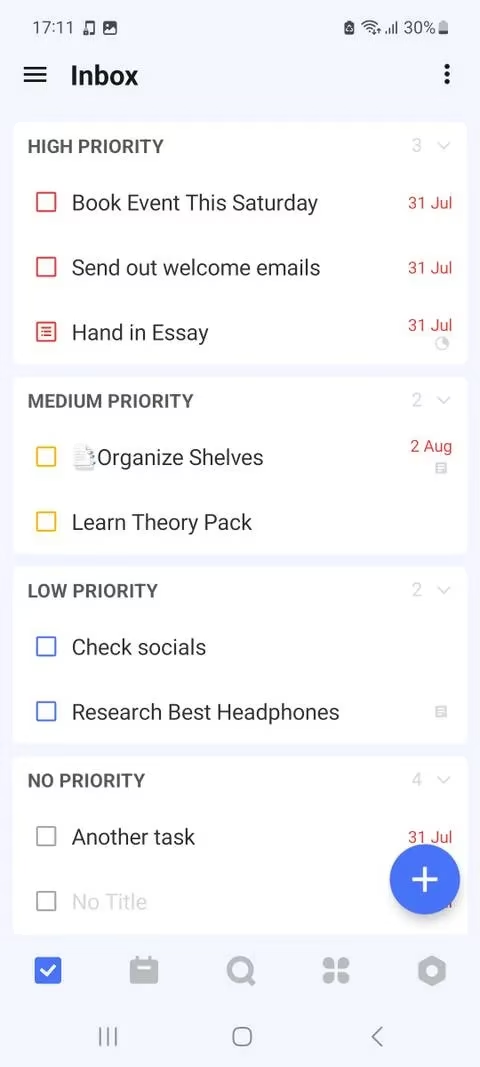
If to‑do apps were gym rats, TickTick would be the one flexing in the mirror at 5 a.m. This beast packs Smart Lists, folders, tags, and color‑coding into a single, chiseled interface. Seriously, Smart Lists are like having a tiny, caffeinated personal assistant that automatically groups your tasks by due date, priority, or whatever secret sorting spell you cast. You want to see only “Overdue” tasks? Poof! Done. You want a list of everything tagged “Side Hustle” that’s due today? TickTick winks and serves it up on a silver platter.
Creating multiple lists from the sidebar is a breeze—color‑code them until your screen looks like a rainbow that means business. And here’s a little secret that’ll make you grin: if you hit the settings button in the sidebar’s lower right corner, navigate to Smart Lists, you can hide all those lists that are just cluttering your life. It’s like decluttering your brain, but without the expensive therapy. Honestly, TickTick’s personalized approach to organization is so effective, you might accidentally become that person who never forgets a thing. No sweat, though—it’s a good look on you.
Available for Android and iOS, with a free tier that honestly could rule a small kingdom. The premium subscription just turns the monarchy into an empire.
Todoist: The Wise Grandmaster of Filters and Priorities
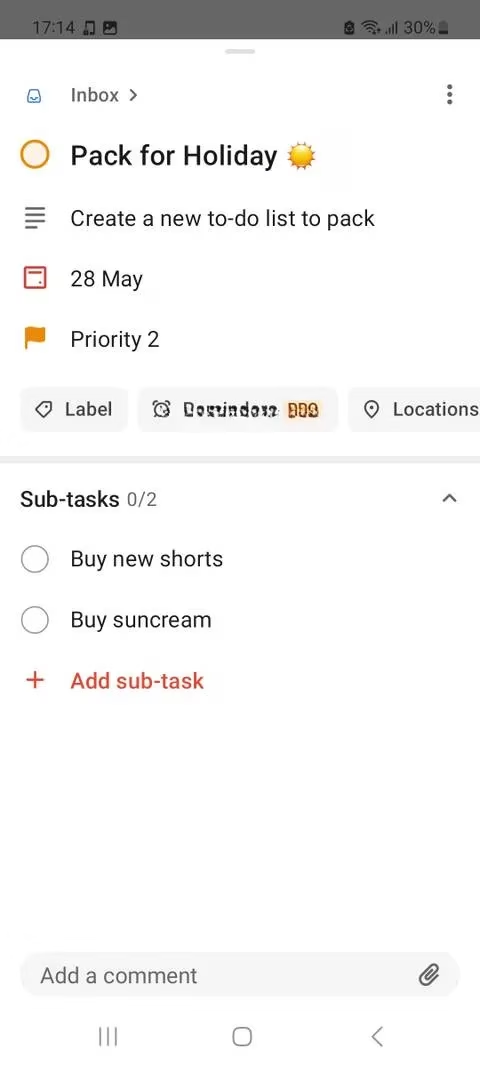
Todoist has been strutting around the productivity block since 2007, and by 2026 it has aged like the finest wine—smooth, powerful, and capable of making you weep with joy. This app’s filter system is basically a logic puzzle that solves your life. Want to see only “high‑priority tasks due this week in the ‘Work’ project”? Go ahead, craft that filter and watch the magic happen. Labels, color‑coded priority levels (yes, there are four—because three just aren’t enough for true control freaks), and a calendar view that lets you reschedule postponed tasks with the flick of a finger.
What sets Todoist apart is its Onboarding Assistant, a friendly little guide that holds your hand if you’re still traumatized by messy spreadsheets. It whispers pro tips like, “Hey, maybe don’t put ‘Conquer World’ before ‘Buy Toothpaste’.” The free plan generously offers up to five projects, which is enough room to shift from total chaos to organized calm. If you’ve fallen into a productivity slump—you know, the one where you watch cat videos instead of doing anything important—Todoist will yank you out with a firm yet loving grip.
You can grab it on Android and iOS. The free version is excellent; the subscription adds features that practically baby‑proof your schedule.
Microsoft To Do: The Daily Ritual Architect That Feels Like Home
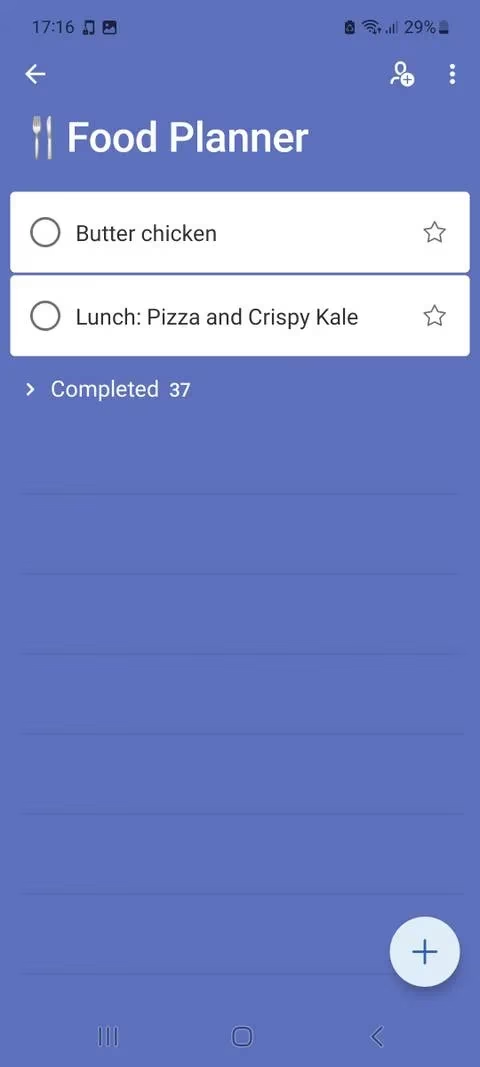
Don’t sleep on Microsoft To Do—it may not have the flashiest logo, but it’s the reliable morning coffee that never lets you down. At its heart is My Day, a sacred digital space that resets every morning, ready to be filled with today’s must‑do’s. The app even whispers personalized suggestions based on what you’ve done (or shamefully ignored) in previous days. It’s like a personal mentor that remembers you have a dentist appointment even when you don’t.
Subtasks are the secret weapon here: break down “Plan Vacation” into “Book flights,” “Find hotel,” and “Plead with cat sitter,” and suddenly the impossible becomes manageable. Tabs like Planned, Important (starred tasks), and All keep every little piece of your life just a tap away. Searching for tasks is effortless, and the interface is so clean it sparkles.
If you’re already wandering through the Microsoft ecosystem, this app wraps around you like a cozy blanket. Perfect for crafting a strong daily routine that laughs in the face of procrastination. It’s free on Android and iOS—no catches, just pure, unadulterated organization.
Memorigi: The Color‑Coded Life Curator That Guards Your Brain
Memory alone is a traitor. Memorigi steps in like a loyal butler, categorizing your entire existence into lists that feel tailor‑made. Color‑coding? Absolutely. The app offers a paint store’s worth of hues so you can tag Family, Work, Birthdays, and that “Books To Read” pile that’s threatening to crush your nightstand. Plus, you can slap charming icons onto lists—hit the three dots on the action buttons panel and pick a little shopping bag, a party hat, whatever tickles your fancy.
Creating groups of lists means your work‑related chaos never bleeds into your personal zen. Picture this: a “Home” group with lists like “Groceries” and “Chores,” and a “Projects” group where deadlines tremble in your presence. Memorigi is the app that understands you have a life outside of spreadsheets, and it guards that boundary like a jealous dragon.
Available for Android, with a free version that’s already a sanity‑saver. A subscription unlocks extra features, but honestly, even the free tier will make your memory feel obsolete.
Singularity: The Cosmic Organizer With Unmatched Connectivity
Now, if the name Singularity doesn’t already make you feel like you’re plugging into the mainframe of productivity, wait until you see what it does. In 2026, this app connects multiple calendars, syncs across devices like a synchronized swimming team, and sets repeating reminders that refuse to let you forget a single anniversary or bill.
Tasks are tamed with three priority levels and a pinning option, so your most urgent mission stays glued to the top. Set due dates, sprinkle notifications throughout the day, and watch your life transform into a well‑oiled machine. The Today and Upcoming tabs give you a crystal‑clear view of what’s barreling toward you, while the Unplaced tab is the shame corner where you toss tasks you haven’t sorted yet. It’s a brutally honest approach: “Look at this pile of Undone. Fix it.”
Singularity marches onto Android and iOS with a free version that’s sturdy as a battleship. The premium subscription adds muscle, but the free edition already packs enough punch to keep you ahead of the game.
Dwight: The Eisenhower Matrix Come to Life
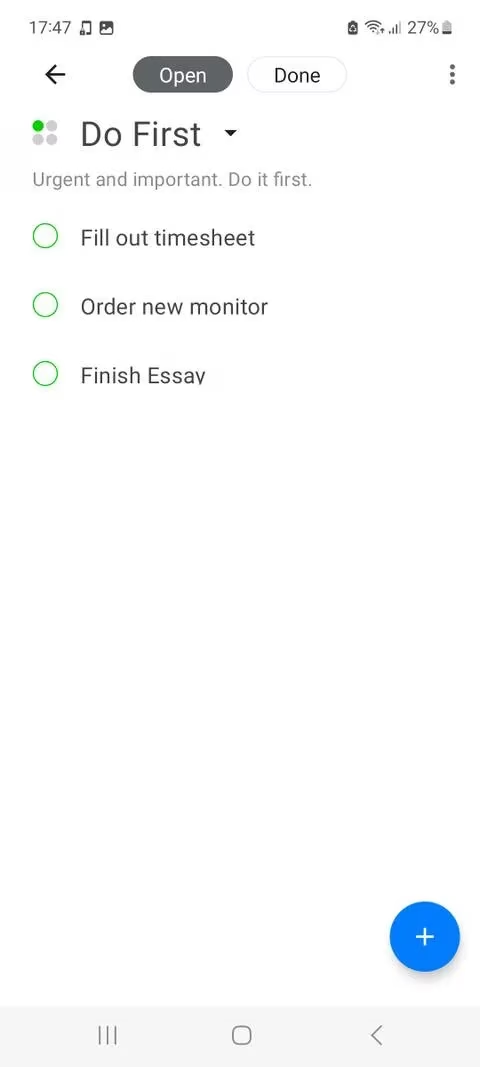
If you’ve ever dabbled in productivity philosophy, you know the Eisenhower Matrix—four quadrants that sort tasks by urgency and importance. Dwight (yes, named after the president who championed the method) is the app embodiment of that principle, and it’s ready to slap your procrastination into another dimension.
The app splits your screen into four legendary zones: Do First (urgent + important, like a fire in the kitchen), Schedule (important but not urgent, your strategic growth stuff), Delegate (urgent but less important, the things you’d happily pass to a clone if you had one), and Eliminate (neither, goodbye!). Swipe left and right to toss a task into its proper quadrant—it’s so intuitive you’ll feel like a productivity wizard within seconds.
There’s even a Backlog section for tasks still awaiting their judgment. Honestly, if you’ve ever felt paralyzed by a never‑ending list, Dwight will grab that list and surgically restructure it while you sip your latte. You know what? The satisfaction of moving a task into “Eliminate” should be classified as a guilty pleasure.
Dwight struts onto Android with a free version (and iOS for a modest one‑time fee). The subscription adds more power, but the core matrix magic is ready to go from the moment you install it. In 2026, Dwight remains the gold standard for priority‑driven souls.
MyLifeOrganized: The Context‑Sensitive Mind Reader
When life hits you with a tidal wave of tasks and you can’t even remember where the kitchen tongs are, MyLifeOrganized swoops in like a cognitive superhero. This app sorts tasks by contexts—places, locations, situations—so you see only what’s relevant when you’re actually standing in the grocery store, sitting at your desk, or hiding in the bathroom for a five‑minute sanity break. It’s like the app reads your mind, takes one look at the mental mess, and says, “Let’s sort this out, champ.”
Subtasks can be nested infinitely deep, meaning you can drill down from “Remodel House” to “Pick paint color” to “Stare at swatches until you lose all will to live.” The Collapse All and Expand All buttons are a godsend—with one click, the jumble becomes a crisp, manageable hierarchy. Searching notes by title, tag, or context takes seconds, making you feel like a data‑wrangler in a sci‑fi movie.
MyLifeOrganized struts on Android and iOS with a free version that packs a punch. The premium tier unlocks advanced sorting sorcery, but even the base version will organize your day with the precision of a Swiss watch.
The Final Gong: Your Tasks Don’t Stand a Chance in 2026
Let’s be real for a second—task management doesn’t have to feel like wrestling an octopus. These seven apps aren’t just tools; they’re loyal sidekicks that transform “I’m drowning!” into “I’ve got this.” TickTick flexes its Smart Lists like the cool kid in school, Todoist filters your life with the calm of a Zen master, and Dwight channels a presidential legacy to obliterate your confusion. Whether you’re a color‑coding artist, a priority‑obsessed planner, or someone who just needs a clean daily sheet, there’s a superhero app here waiting to rescue your sanity.
Download one—or, you know, test them all, nobody’s judging—and watch your productivity soar higher than that pile of laundry you’ve been ignoring since last Tuesday. Chaos? Not on your watch. Not in the glorious, well‑organized year of 2026.
Comments