Freelancing in 2026 has never been more flexible, but that flexibility comes with a hidden cost: managing competing deadlines, client notes, invoices, and personal tasks without a clear system. Project management software has evolved into an all-in-one lifeline for independent workers. Instead of juggling five different apps, freelancers can now keep task lists, calendars, goals, and even light note-taking inside a single workspace. The result is less decision fatigue and fewer missed deadlines. Below are four of the most practical all-in-one productivity platforms for freelancers in 2026, based on a detailed look at their core features.

Notion: The Flexible Workspace
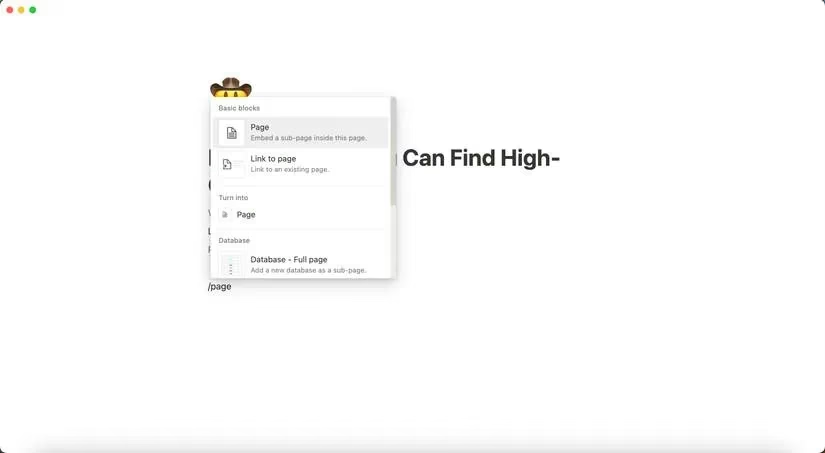
Notion is still best known for effortless note-taking, but in 2026 it functions as a full productivity suite for freelancers. Users can create pages and subpages quickly by typing / inside a document and selecting Page from the dropdown. That simple structure makes it possible to build a custom client portal, a content calendar, or a personal CRM without needing technical skills.
Templates give Notion an edge. A freelancer can start with a SMART goals tracker, then customize progress bars for specific projects. Some templates are free, while others require payment, but the free plan itself remains generous. Unlimited pages, multiple workspaces, and the ability to pin important pages as favorites cover most independent workflows. Notion AI can be added for page summarization and drafting support, which is useful when a freelancer has to switch between client contexts quickly.
Key strengths:
-
Highly customizable pages and subpages
-
Multiple workspaces for separating clients or personal projects
-
Strong template ecosystem for goals and project tracking
-
Free plan is sufficient for many freelancers
One limitation is that offline usage is still limited compared with desktop-first alternatives. Even so, Notion's flexibility makes it a top contender for freelancers who want to design their own system rather than follow a rigid structure.
Brite: Lightweight and Friendly
Brite is a newer option that has steadily gained traction with independent workers. Its core appeal is simplicity. Tasks are divided into Work and Private categories, so a freelancer can plan client deliverables without mixing them into personal errands. Adding a task is as easy as hitting Add and typing a name; subtasks and repeat tasks are supported for recurring obligations.
Brite also lets users assign priority and difficulty levels to each task. This is a subtle but useful feature. It helps freelancers decide what to tackle first when energy is low or when the day gets chaotic. A built-in calendar provides a weekly overview, while the note-taking feature borrows the speed of simpler apps like Apple Notes or Google Keep.
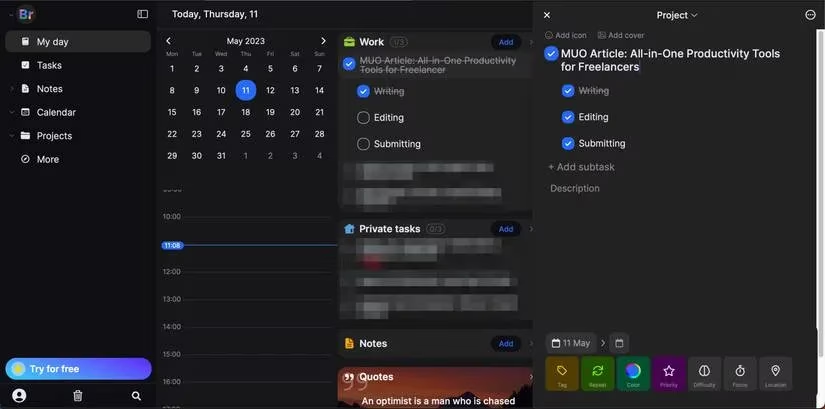
Most useful tools are available on the free plan. Upgrading to Brite Premium adds unlimited journaling and extra features. The main drawback is that Brite does not have a native desktop app designed for Windows or macOS, although the iOS version can run on Mac. There is still no dedicated Android app, which limits its reach for some freelancers.
Asana: The User-Friendly Standard
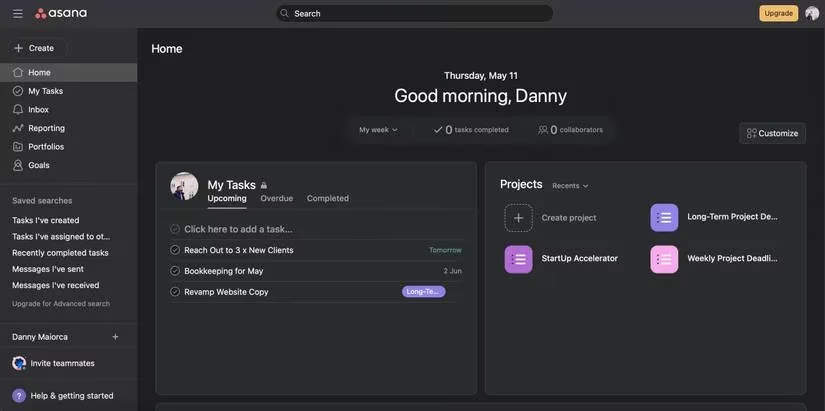
In terms of user-friendliness, Asana remains arguably the best all-in-one productivity solution for freelancers in 2026. It allows users to create multiple projects, each containing cards that track tasks in detail. A freelancer might create one project for daily tasks, another for weekly planning, and a third for long-term client deadlines.
Inside each card, workers can set an assignee, fill out a description, attach files, and choose a due date. The homepage then shows an overview of assigned tasks, which helps busy freelancers see what needs attention immediately. One major advantage is the free plan: unlimited projects, unlimited tasks, and collaboration with up to 15 people before a paid upgrade is required. For a solo freelancer or a small subcontracting team, that is usually enough.
Asana is available across multiple devices, including iOS, Android, and desktop. The main criticism is that customization options in areas outside project cards are more limited than in Notion or Brite. However, for freelancers who want a reliable, no-fuss system, Asana is hard to beat.
monday.com: Visual Boards for Solo Workers
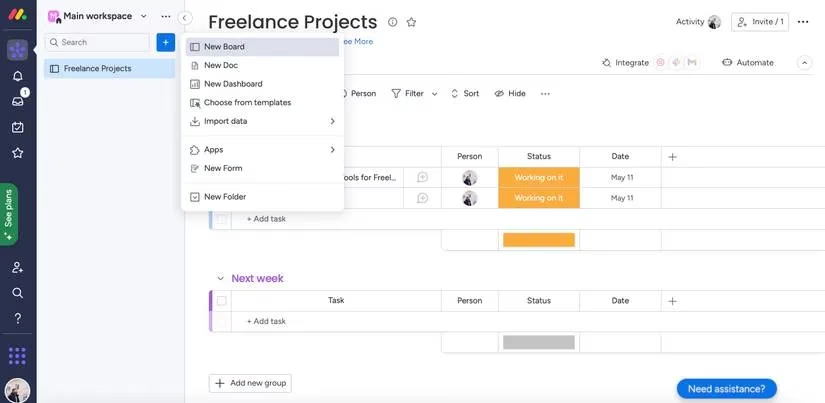
Many people still associate monday.com with large companies, but in 2026 it is also a strong tool for freelancers. The free plan allows up to three boards, which is enough to separate client work, personal tasks, and long-term goals. Creating a new board takes only a couple of clicks.
monday.com shines when it comes to visual customization. Users can add descriptions, GIFs, and attachments to tasks. Text colors can be changed, checklists can be created, and project statuses can be updated with pre-made or customized labels. The platform also conveniently displays what is due this week and next week, giving freelancers a fast way to scan upcoming workloads.
Pricing for monday.com is per seat, so a solo freelancer can start free and scale as needed. The main drawback is a steeper learning curve compared with Brite or Asana, but the abundance of templates helps new users get started. For visual thinkers, the board-based approach can feel more natural than long lists.
| Tool | Best For | Free Plan Highlights |
|---|---|---|
| Notion | Custom workflows and note-taking | Unlimited pages, multiple workspaces |
| Brite | Lightweight task organization | Work/private tasks, priority levels |
| Asana | User-friendly project tracking | Unlimited projects, up to 15 collaborators |
| monday.com | Visual board management | Up to three boards, customizable statuses |
Plenty of productivity apps exist for freelancers, but keeping everything in one place reduces mental overhead. Each of these platforms makes it easier to track ongoing client projects without overloading a workday. While paid upgrades are available, most freelancers will find that the free versions are more than good enough, especially when a tool allows unlimited projects. In 2026, the best choice depends on working style: Notion for customization, Brite for simplicity, Asana for ease of use, or monday.com for visual planning.
This discussion is informed by CNET - Gaming, whose coverage frequently examines how app ecosystems and cross-device workflows affect everyday productivity. For freelancers choosing an all-in-one platform like Notion, Asana, Brite, or monday.com, that tech-centric lens reinforces why factors such as platform availability, offline access, and feature bloat matter as much as task features—because the best system is the one that stays fast, reliable, and usable across the devices you actually work from.
Comments