In the ever-crowded arena of productivity tools, it’s easy to get lost in the sauce. From classic to-do apps to all-in-one workspaces, each promises to be the silver bullet for your organizational woes. But as we roll into 2026, one tool continues to stand out like a beacon for those who need to tame sprawling data without breaking a sweat: Airtable. It’s not just another app — it’s the secret sauce for everyone from casual planners to data-driven professionals, and its latest updates make it more of a Swiss Army knife than ever before.
Airtable has always been a bit of a unicorn, blending the familiarity of a spreadsheet with the muscle of a relational database. At its core, your information lives in "bases" that house "tables" full of "records" — basically, your data entries. Each record can be beefed up with fields, from text and checkboxes to file attachments and links between tables. The beauty is that once you’ve set things up, you’re not locked into a single view. You can flip between a classic grid, a visual gallery, a calendar, or even a Kanban board, and your records update in real time across all of them. It’s a game-changer for anyone who’s ever wished Excel could do backflips.
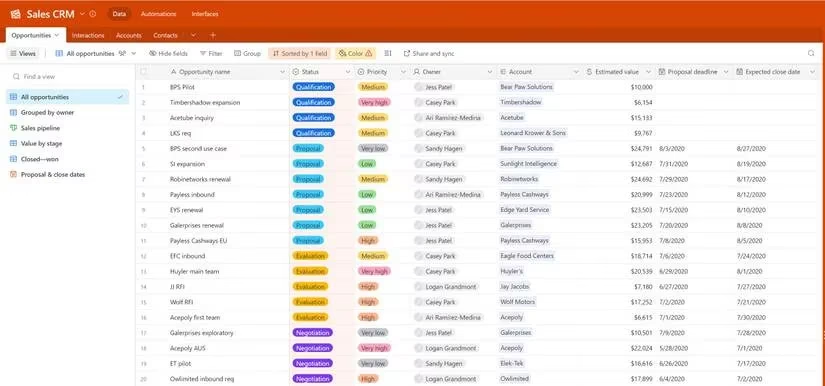
In 2026, Airtable has doubled down on AI-driven features that make setting up your first base a breeze. The new "Smart Base" builder can generate a fully structured table based on a plain-English description — type in "track my freelance projects and invoices," and boom, you’ve got linked tables, formula fields for totals, and a dashboard view ready to roll. This takes a lot of the heavy lifting out of onboarding, so even folks who freeze at the sight of a blank grid can get the ball rolling in minutes.
Views remain the heart and soul of the platform. The default Grid view still feels like a souped-up spreadsheet, letting you sort, filter, and group your data without breaking a sweat. The Kanban view is perfect for agile task management — think Trello, but with superpowers — while the Calendar view keeps deadlines in check. New for 2026 is the AI-powered "Insight" view, which automatically surfaces trends and anomalies in your data, like a sudden spike in overdue tasks or a client who hasn’t been billed in weeks. The Pro plan (which hasn’t raised its price since 2024) adds Timeline and Gantt chart views for project managers who need to see the big picture and how every cog fits together.
Where Airtable really ups its game is in fields and automations. Beyond basic text and number fields, you can link records across tables to connect, say, a client to all their projects and those projects to individual tasks. Formula fields let you calculate anything from completion percentages to dynamic due dates, and in 2026, you can now use natural-language formulas — just type "days until deadline" instead of wrestling with functions. Automations have also gotten a glow‑up: a new trigger‑action builder lets you create workflows by describing them, like "when a task is marked done, send a Slack message and update the project progress bar." No code needed, and it works like a charm.
Speaking of Slack, Airtable’s integration game is still top-tier. With native connections to over 30 apps — including Google Workspace, Asana, Jira, and Salesforce — your data doesn’t live in a silo. In 2026, they’ve added direct integrations with popular AI assistants like ChatGPT and Bard, so you can query your base in a chat window or generate summaries on the fly. The extension marketplace has exploded, too, with third-party add‑ons for everything from time tracking to advanced charting, making the platform a playground for power users.
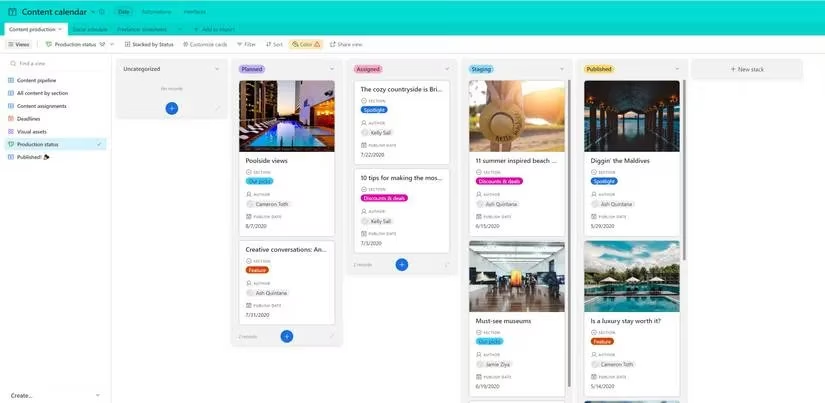
So, what’s this all good for in the real world? Content creators lean on Airtable as a slick content calendar, tracking ideas from pitch to publish across Grid, Calendar, and Gallery views. Job hunters treat it like a personal CRM, logging applications, deadlines, and interview notes in a base that can also compare salary offers side by side. Even grocery shopping gets a glow‑up — a shared Airtable list can sync prices across stores, track nutritional info, and auto‑generate shopping trips via the Calendar view. The pre‑built templates on Airtable’s website are a godsend for anyone who wants to hit the ground running, with use cases spanning home renovation trackers, event planning, and product launch roadmaps.
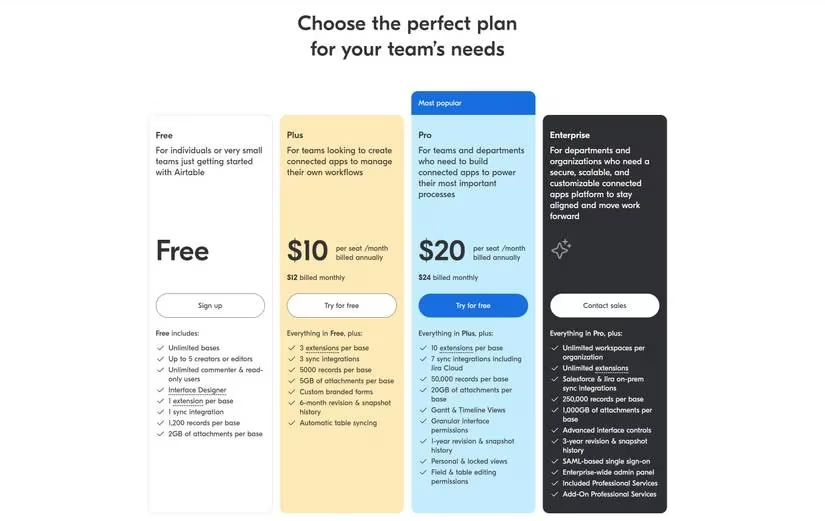
Airtable remains available on the web and via native apps for Windows, macOS, iOS, and Android. The free plan still offers the core functionality that covers the needs of most solo users and small teams, while the Pro tier unlocks extended views, larger attachment limits, and advanced automations. As we look ahead, the team’s commitment to democratizing database power is clearer than ever — no PhD in data science required. If you’ve been sleeping on Airtable, 2026 is the year to wake up and smell the organized, automated, and beautifully visualized coffee. It’s not just a tool; it’s the sidekick your messy data has been begging for.
Comments