Listen up, productivity warriors! In the chaotic digital battlefield of 2026, where data is king and organization is the ultimate power-up, one feature stands head and shoulders above the rest, transforming mere mortals into efficiency titans. That feature is none other than Airtable's legendary Attachment field. Forget about juggling between a zillion tabs and apps; this isn't just a feature, it's a whole new vibe for managing your digital life. It’s the secret sauce that turns your Airtable base from a simple spreadsheet into a command center worthy of a sci-fi movie. Seriously, it's that good.
The Attachment Field: Your All-in-One Digital Swiss Army Knife 🗂️
The Attachment field is, quite frankly, Airtable's killer app. It allows you to attach any file directly to your records, creating a hyper-connected hub where your data and its supporting documents live in perfect harmony. Imagine this: project briefs, mood board images, client contracts, epic presentation decks, and raw data spreadsheets—all chilling right next to the task or item they belong to. No more frantic searches through Google Drive folders named "Final_Final_v3_Really." This is next-level organization, folks.
Here’s the lowdown on what makes it tick:
-
Universal File Support: Hook up files from virtually anywhere! Your local machine? Check. Cloud services like Google Drive, OneDrive, Dropbox, and Box? Double-check. It even pulls from Facebook photos and lets you snap pics directly with your webcam. Talk about versatility!
-
Size Matters (But Only a Little): Keep your files under 5GB, and you're golden. That's enough space for pretty much anything short of a feature-length 8K movie.
-
Smart Previews: For common file types like images (PNG, JPG), PDFs, Word docs, and even Photoshop files, Airtable displays slick thumbnail previews. Just click to view them full-screen. For more obscure file types, you won't get a preview, but you can still open and manage them. No file left behind!
Adding the Power: Two Paths to Attachment Glory ✨
Adding this game-changing field to your base is easier than scoring a headshot in a tutorial level. You've got two primo methods:
1. From the Grid View (The Macro Approach)
This is for when you're thinking big picture. In your Grid view, simply scoot over to the end of your field headers and hit that glorious plus-sign (+).
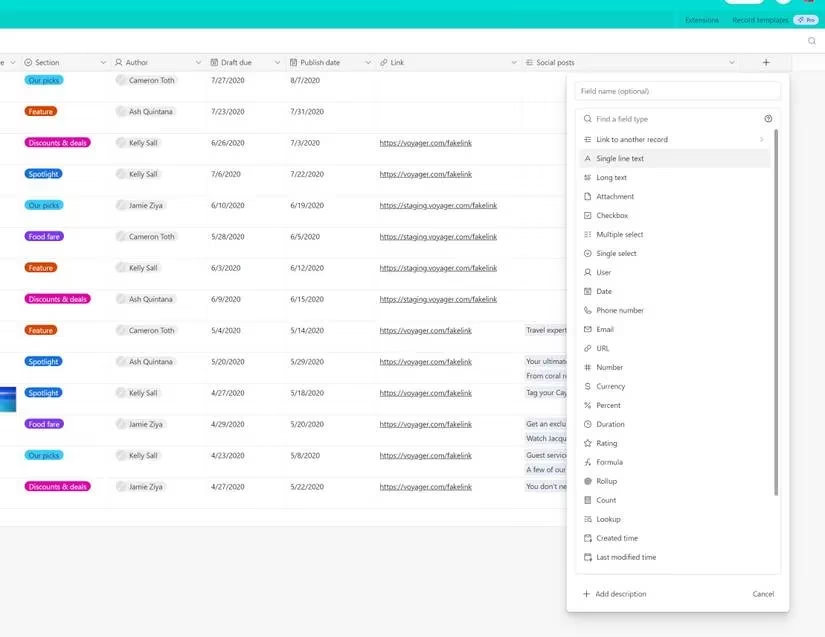
A menu pops up showcasing all the field types. Scroll down, find "Attachment," give it a click, name it something cool (or don't—it defaults to "Attachments"), and bam! Hit "Create field." Instant upgrade.
2. From Within a Record (The Micro Approach)
Need to add it on the fly while deep in a record? No sweat. At the bottom of any record, click "Add new field to this table." You'll see a drop-down menu; change it from "Single-line text" to "Attachment," name it, save it, and you're done. It's that simple.
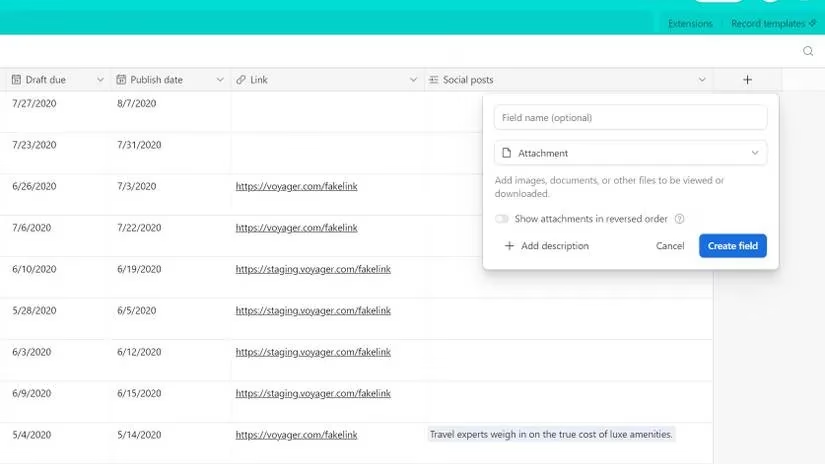
Pro-Tip Alert! 🚨 You might see an old toggle for "Show attachments in reverse order" if you're using a legacy template. That setting was sunsetted way back in April 2020. In 2026, you're the master of order—just drag and drop attachments within the field to arrange them however your heart desires.
Mastering the Art of Attachment: Upload Like a Pro 🎮
Once the field is live, attaching files is where the real fun begins. The interface is so intuitive, it's almost criminal.
In Grid View:
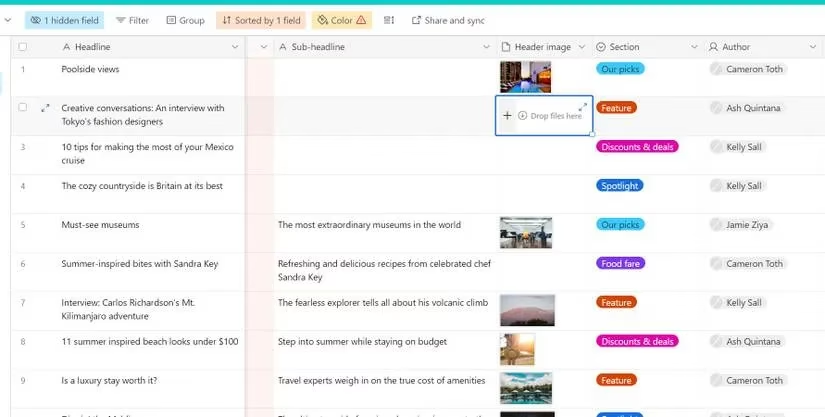
Click on the Attachment cell for a record. You'll see a neat little plus-sign (+) button. Click it to open the upload panel. Or, for the true power users, just drag and drop a file directly from your desktop onto the cell. It's satisfyingly instantaneous.
Inside a Record:
The experience is even more immersive. The Attachment field transforms into a large, inviting box that says "Drag files here or browse." The choice is yours: drag-and-drop for speed, or click "browse files" for precision.
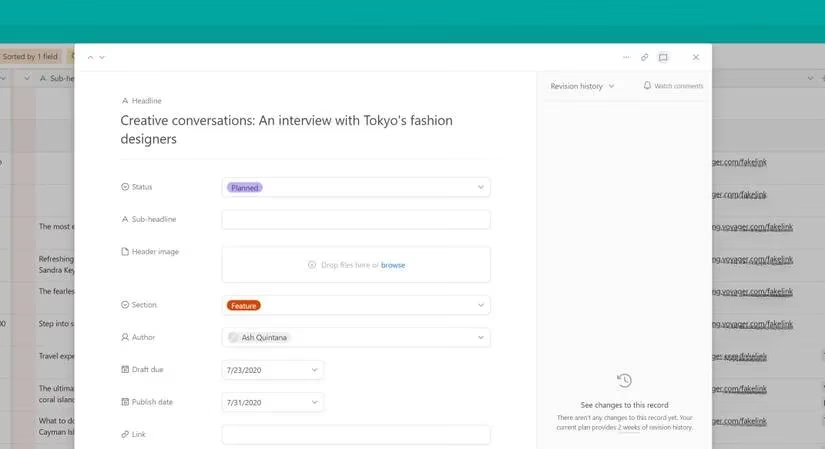
The Grand Upload Panel: Your Gateway to Everywhere 🌐
Whether you click the plus in Grid view or "browse files" in a record, you're greeted by the majestic Upload Panel. This is your mission control for file sourcing.
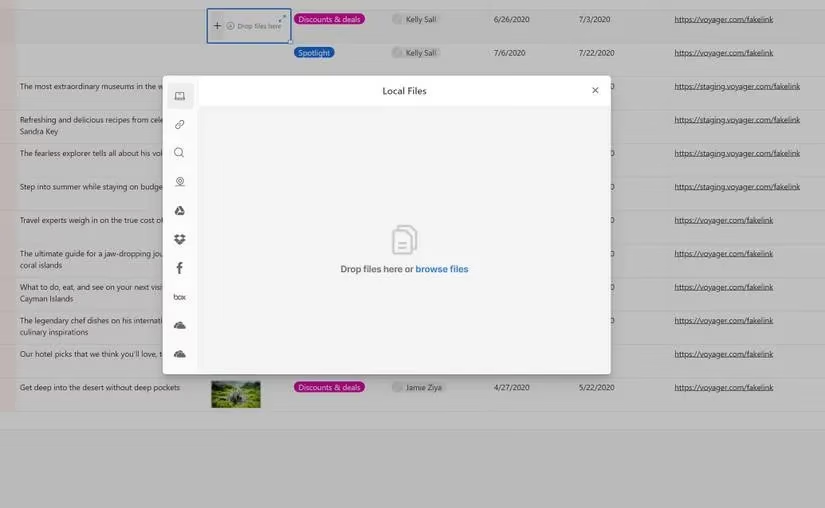
Check out these insane options:
| Source | What You Can Do |
|---|---|
| Your Computer | Drag, drop, or browse. Classic and effective. |
| Link from URL | Attach a file directly from a web address. Perfect for grabbing the latest assets. |
| Web Search | Search the web for an image right from the panel. Mind. Blown. 🤯 |
| Take a Picture | Fire up your webcam and snap a pic on the spot. Ideal for quick prototypes or IRL updates. |
| Cloud Services | Connect to Google Drive, OneDrive, Dropbox, Box. Your files, everywhere. |
| Pull photos directly from your Facebook albums. |
Heads Up, Gamers: To use cloud services or Facebook, you'll need to connect your accounts first. Airtable will guide you through a quick, secure OAuth process. It's a one-time setup for infinite convenience.
Why This is a Total Game-Changer in 2026 🏆
Let's be real. In today's hyper-connected, always-on digital workflow, context is everything. Scattering files across different platforms is a recipe for disaster—missed deadlines, lost versions, and general chaos. The Attachment field solves this by creating a single source of truth.
Think about it:
-
Project Managers: Keep every spec sheet, mockup, and contract tied directly to the project record.
-
Content Creators: Attach draft videos, thumbnails, and scripts right to your content calendar entries.
-
Sales Teams: Link proposals, signed contracts, and customer logos directly to the client record.
-
Event Planners: Store venue photos, vendor agreements, and floor plans with each event.
It erases friction, boosts speed, and, let's face it, makes you look like an absolute wizard to your team. Everything you need is not just close—it's literally attached. In the high-stakes game of modern productivity, that's not just an advantage; it's a cheat code.
So, what are you waiting for? Stop letting your files live in exile. Integrate them, organize them, and conquer your workflow with the unparalleled power of Airtable's Attachment field. Your future organized self will thank you. Mic drop. 🎤
Comments