In the bustling digital landscape of 2026, where new productivity apps sprout like mushrooms after a rainstorm, one often overlooks the quiet, powerful tool already nestled within their Apple devices. You don't need to clutter your iPhone or Mac with yet another app that promises the moon but delivers a handful of digital dust. The most capable and elegantly integrated to-do list manager is already there, humming away in the background of Apple's ecosystem—it's powerful, completely free, and syncs across your devices as effortlessly as a flock of starlings changing direction mid-flight. Yes, we're talking about Apple Reminders, the unassuming app that has evolved from a simple alert system into a full-fledged productivity command center.
🗣️ Siri: Your Verbal Scribe
Ideas and tasks have a mischievous habit of popping into your head at the most inconvenient moments—while you're navigating rush-hour traffic, in the middle of a downward dog, or even when your hands are covered in soap suds. In these moments, fumbling to open an app and type is about as practical as trying to knit a sweater during a skydive. This is where Reminders' seamless integration with Siri becomes your superpower.
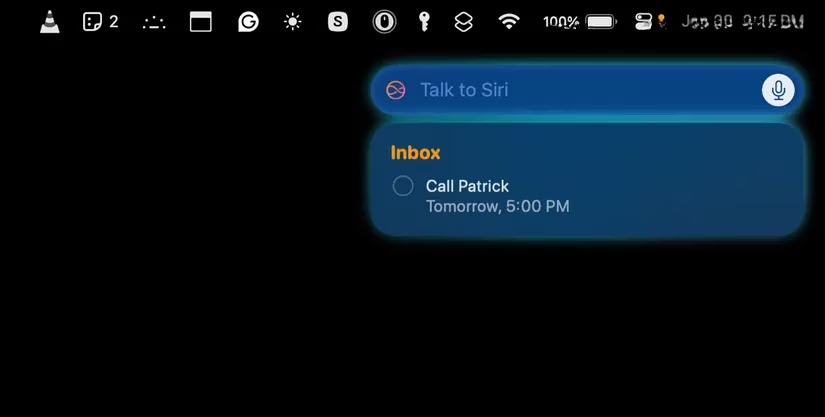
Using Siri is one of the most frictionless ways to capture tasks. Instead of interrupting your flow, you can simply speak to the air:
-
"Hey Siri, remind me to email the client report at 3 PM."
-
"Hey Siri, add 'buy birthday gift for Mom' to my Personal list."
-
"Hey Siri, remind me to water the plants when I get home."
Siri acts as your verbal scribe, instantly creating a perfectly detailed reminder, saving you precious time and keeping your hands free. It's like having a personal assistant who lives in your pocket and works for free.
🔄 Flawless Sync: The Digital Harmony
One of the most compelling reasons to crown Apple Reminders as your task manager is its flawless, almost telepathic, cross-device syncing. Once your devices are connected via the same Apple ID, every action you take ripples through your ecosystem instantly, creating a symphony of organization. This integration is as smooth as mercury flowing across a glass table.
For example:
| Action on Device | Result on Other Devices |
|---|---|
| Add a task on your Mac during work | It appears on your iPhone while commuting |
| Set a reminder on your Apple Watch | It syncs to your iPad for later review |
| Check off a task on your iPhone | It's marked complete on your Mac |
This level of harmony makes staying organized effortless, whether you're at your desk, on the train, or anywhere in between.
🤝 The Native App Symphony
If you're struggling with a fragmented productivity system—juggling multiple third-party apps like a circus performer with too many plates spinning—it's time to simplify. By leveraging Apple's native apps together, you create a cohesive, powerful workflow that feels less like work and more like a well-conducted orchestra.
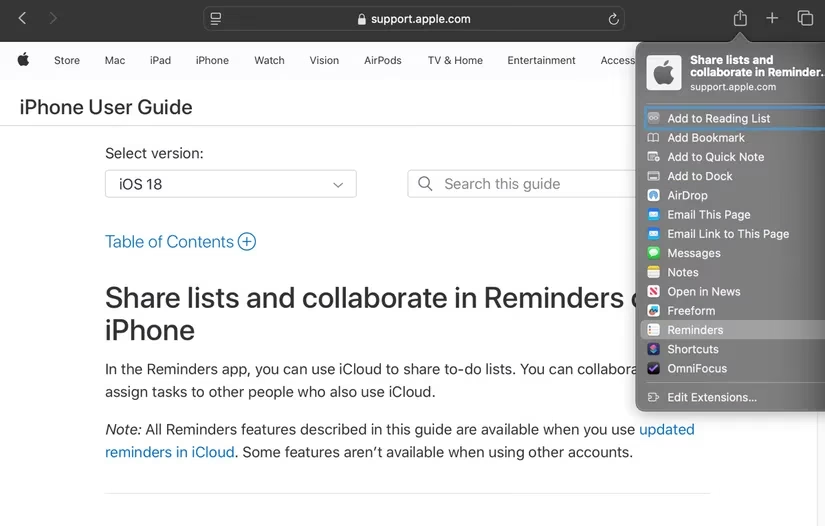
When you use Apple's built-in apps in concert, magic happens:
-
📝 Notes & Reminders: Brainstorm article ideas in Notes and create a follow-up task directly from a note with a single click. Your creative spark and your action item are now intrinsically linked.
-
🌐 Safari & Reminders: Find a fascinating long-read but short on time? Share the link directly from Safari to Reminders. It creates a task with the link embedded, so you never lose that "read later" article again.
-
✉️ Mail & Reminders: An email requires action? Simply drag it from the Mail app and drop it into Reminders. A new task is born, with the original email neatly attached for context.
This ecosystem approach ensures everything stays in sync, works effortlessly, and keeps your digital workspace as clean and distraction-free as a Zen garden.
🗂️ Organize Like a Pro: Beyond Simple Lists
While Reminders offers straightforward lists, its true power lies in its advanced organizational tools. It's the digital equivalent of a master carpenter's toolbox—simple on the outside but filled with specialized instruments for any job.
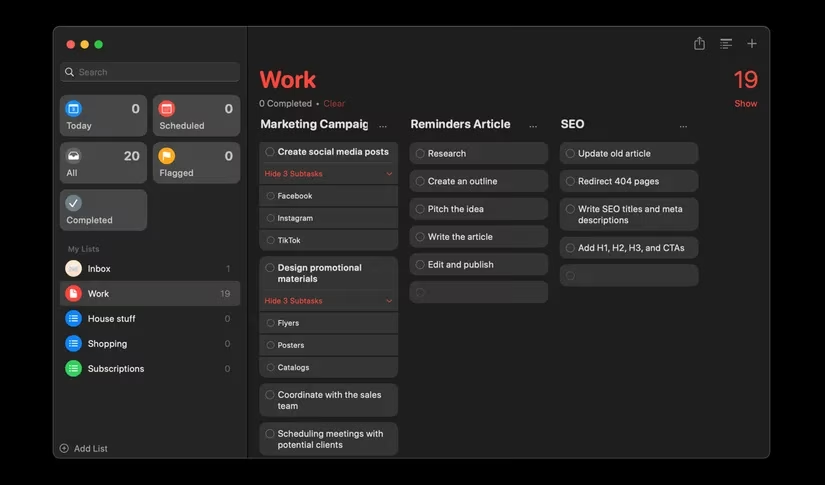
A smart way to start is by creating an Inbox list—a digital holding pen where you can dump any task that comes to mind. Later, you can sort them into categorized lists like Work, Travel, or Home. But don't stop there!
-
Sections: Break down large projects within a list. Under your Work list, you could have sections for "Q2 Marketing Blitz" and "App Redesign," each with its own set of subtasks.
-
Smart Lists: Let the app do the filtering for you. Create lists that automatically show tasks based on criteria like due date, priority, or tags.
-
Kanban View: If a list starts to feel cluttered, switch to the Kanban-style column view. Visually move tasks between columns like "To Do," "In Progress," and "Done" with simple drag-and-drop. It turns project management into a satisfying game.
📍 Location-Based Reminders: Your Context-Aware Butler
Apple Reminders truly shines by understanding that not all tasks are tied to a time—many are tied to a place. Its location-based reminders are like having a context-aware butler who knows exactly when and where to hand you your metaphorical umbrella.
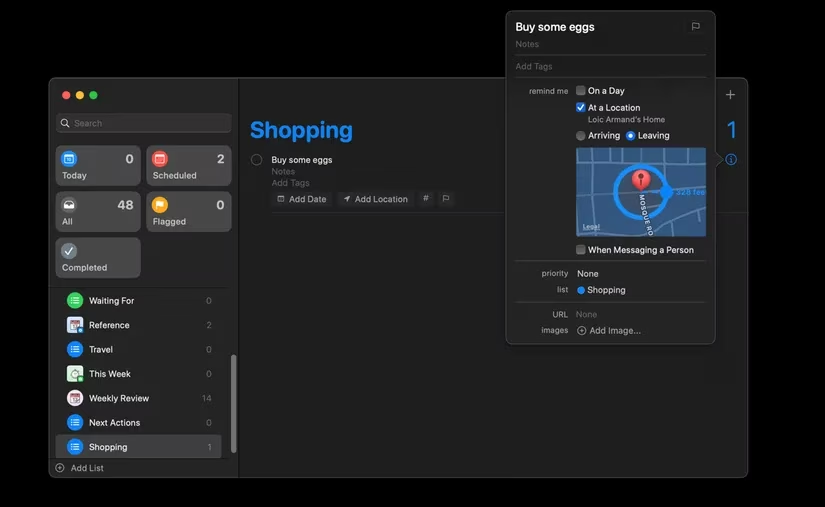
These intelligent nudges can be lifesavers:
-
Remind you to pick up the dry cleaning when you leave the office.
-
Prompt you to water the plants when you arrive home.
-
Nudge you about delegated tasks when you enter the specific meeting room.
Setting one up is straightforward:
-
Create a new reminder.
-
Tap the info icon (ⓘ).
-
Enable "At a Location" and type in an address or choose a frequent location like "Home" or "Office."
-
Choose whether to trigger it upon Arriving or Leaving.
Your device's geofencing technology does the rest, ensuring you're reminded precisely when it's most relevant.
🚀 Conclusion: Your Built-In Command Center
As we move deeper into the 2020s, the value of a streamlined, integrated, and private digital toolset cannot be overstated. Apple Reminders has matured into far more than a simple to-do app; it is a free, fully-featured task management hub built into the very fabric of your Apple devices. Its strength lies not in overwhelming feature bloat, but in its deep, intuitive connections with Siri, Mail, Safari, Notes, and your device's location services. If you've been overlooking this pre-installed powerhouse in favor of more complex (and often costly) third-party apps, 2026 is the perfect time to give it a serious try. You might just find that the best tool for the job was right under your fingertips—or just a "Hey Siri" away—all along.
Insights are sourced from The Verge - Gaming, and they help frame why “built-in” tools like Apple Reminders keep gaining mindshare: platform-level integrations (voice capture, notifications, and cross-device sync) reduce friction in the same way polished system UX can shape how people discover and stick with games—making the default experience feel effortless enough that users stop shopping for alternatives.
Comments