For anyone who has ever missed an appointment because a cloud calendar failed, disappeared, or demanded more personal data than a simple schedule should require, the terminal may look like an unlikely rescue. Yet in 2026, Calcure is attracting attention as a practical, privacy-minded calendar and task manager for users who prefer a keyboard-driven workflow. The Python-based tool runs inside a terminal user interface, or TUI, and combines a monthly calendar, a journal-style task list, configurable holidays, weather information, and imports from other terminal utilities. It is not a flashy mobile app, but it does something increasingly valuable: it keeps essential scheduling data close to the user.

The appeal is easy to understand. Calendar and organization software has been part of computing since the early Unix era, and modern smartphones ship with calendar apps by default. Google Calendar is probably the best-known example. It is useful, widely available, and tied to Google accounts across Android, ChromeOS, and the web. But that convenience comes with a familiar trade-off. A calendar hosted by an advertising company can add another layer of personal data to a profile that may be sold, rented, shared, or used to refine advertising. If an account is ever suspended or deleted, the calendar can vanish along with email, documents, and photos. Can a terminal application really replace that kind of cloud service? For many privacy-conscious users, the answer is yes, especially when the alternative is a lightweight local tool.
A Local-First TUI for Modern Keyboard Users
Calcure is designed for users who do not need a cloud platform for basic calendar needs. Most Linux distributions already include a calendar, and many graphical calendar and task manager applications are available. However, GUI applications consume system resources, and some users regard them as unnecessary bloat. Calcure takes the opposite approach. Its terminal interface is modern, customizable, and attractive enough for daily use, while remaining fast and focused. It manages events and tasks, supports imports from calcurse and taskwarrior, and can display the current weather. That combination makes it more than a simple date grid.
Calcure is a Python application and requires Python 3 and PIP. It also depends on the holidays and jdatetime Python libraries. Installation is straightforward for users who are comfortable with the command line:
pip install holidays jdatetime

pip install --upgrade calcure
After the requirements are satisfied, installation takes only seconds. When Calcure starts for the first time, it creates configuration and data files in ~/.config/calcure/. The application can then be launched from any terminal with the command calcure.
Calendar and Journal in One Terminal Window
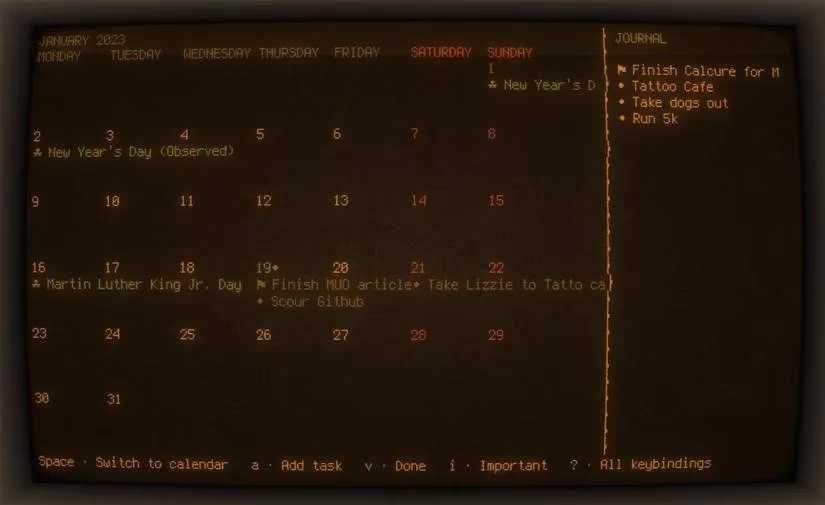
The default Calcure screen is divided vertically. The wider left section shows the current month, with major holidays already marked. The right section is the journal, a task area for items that need to be done without being assigned to a specific date or event. Only one section can be edited at a time, and the Space key toggles between the calendar and the journal. This simple split gives users both a schedule and a to-do list without forcing them into separate applications.
Customization is handled through the configuration file. Users can open it with a terminal editor such as nano:
nano ~/.config/calcure/config.ini
The file contains many options. Users do not need to change all of them, but several settings are especially useful. Calcure can be pointed to a taskwarrior folder and a calcurse events file. A privacy mode can replace sensitive information with an asterisk, which is helpful when someone might be looking over the user's shoulder. The line privacy_mode = no can be changed to yes, and privacy mode can also be toggled from inside Calcure with the asterisk key. Weather display can be enabled or disabled, and weather_city and holiday_country should be set to the user's nearest city and country. Other options control the first day of the week, weekend days, journal title, color schemes, and icons for vacations, flights, Zoom calls, and dentist appointments.
Events and Tasks Without the Cloud
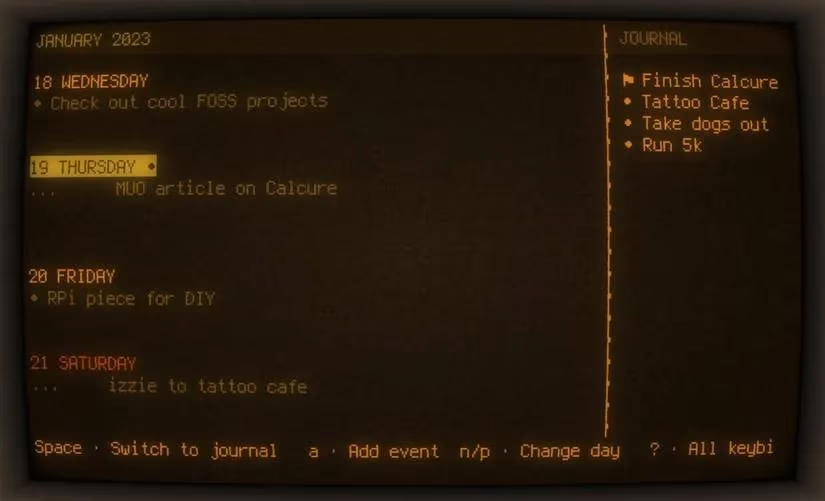
In the calendar view, users can switch from the monthly view to a daily view with the v key and move between days with n, p, or the Up and Down arrow keys. To add an event, the a key opens an entry prompt. From the monthly view, Calcure asks for the date of the month. Users can also press g in either view and enter a date directly. Other useful calendar bindings include h and l for high or low event priority, d for deletion, and e for editing.
The journal side offers a similar keyboard-driven workflow. A complete list of bindings is available by pressing the question mark key. Some of the most useful journal commands include:
| Key | Action |
|---|---|
a |
Add a task |
A |
Add a subtask |
v |
Mark a task as done |
u |
Unmark a task |
h |
Mark or unmark a task as important |
l |
Mark or unmark a task as low priority |
. |
Toggle privacy for a task |
d |
Delete a task and its subtasks |
D |
Delete all tasks |
f |
Add or change a deadline |
F |
Remove a deadline |
s |
Toggle between task and subtask |
e |
Edit a task |
C |
Import tasks from Calcurse |
W |
Import tasks from taskwarrior |
These bindings make Calcure efficient for users who already work in a terminal. Instead of switching between a browser, a desktop calendar, and a separate task manager, they can keep events and tasks in one text-based environment. The application also avoids handing scheduling data to advertising companies. That does not mean Calcure is the right choice for every user. People who depend on shared calendars, mobile notifications, or real-time collaboration will still need cloud-based tools. But for individual users who value local control, the terminal remains a surprisingly capable place to organize a day.
In 2026, the question is not whether cloud calendars are convenient. They clearly are. The more interesting question is whether users need that convenience for every appointment and every task. Calcure suggests that many do not. It offers a focused, customizable, keyboard-first alternative that keeps the calendar and the to-do list close at hand, without asking for an account or an advertising profile. For the modern keyboard warrior, that may be exactly the point.
Comments