In 2026, the boundary between work and personal life has grown thinner than ever. Jordan, a mid-level project manager and parent of two, knows this struggle intimately. Between sprint deadlines, soccer practice, grocery runs, and a looming home renovation, Jordan's mind is a constant whirlwind of to-dos. Like many, Jordan tried endless productivity apps, paper planners, and sticky notes, but nothing stuck. That is, until a colleague recommended ClickUp—a customizable digital workspace—and more importantly, its library of templates. This is the story of how Jordan moved from overwhelmed to in control, one template at a time.
ClickUp offers a flexible digital space for both personal and work projects. While the platform is already powerful, templates supercharge the experience by providing pre-built frameworks that save time and reduce the guesswork. Jordan discovered five templates that transformed the way work and life intersect. Here is how each one helped.

🚀 Agile Project Management: Taming the Work Whirlwind
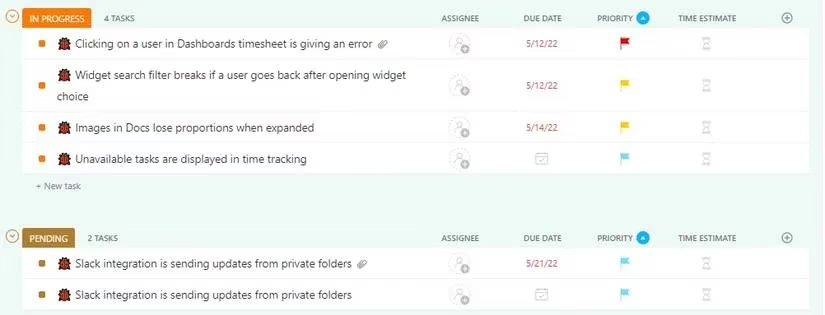
Jordan's work projects often involve multiple deliverables that must pass through various phases before completion. The agile project management template provides a beginner-friendly framework for exactly this scenario. It offers a clear workflow where tasks can be prioritized, project status updated, deadlines assigned, and more with just a few clicks. Collaboration becomes easier too, since team members can communicate by commenting on individual tasks.
The template shines in its multiple views—list, board, timeline, and calendar—each offering a different lens. Jordan uses the list view to group, sort, and filter daily tasks into sections, while the timeline view helps create roadmaps and manage resources with a linear schedule. Pre-built statuses like in-progress and completed keep everything moving, and tasks can be sorted by due date, priority, or time required. For Jordan, this template brought a sense of order to even the most complex sprints.
🗓️ Schedule Blocking: Reclaiming the Calendar
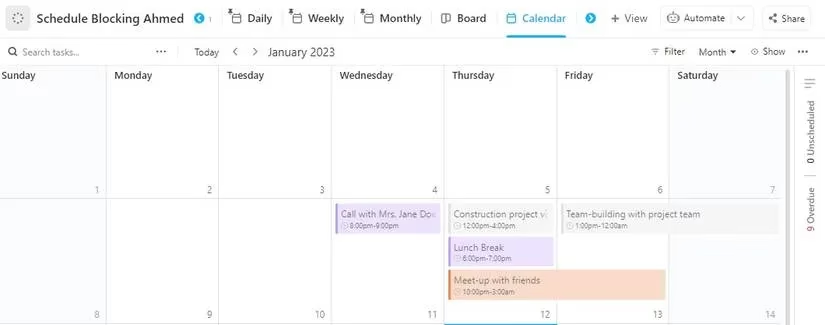
Jordan's calendar used to be a patchwork of overlapping meetings, forgotten appointments, and last-minute scrambles. The schedule blocking template changed that by following the time-blocking method: dividing the day into blocks, each designated for a specific task. The template tracks meetings, reservations, events, and more.
With views like activities, form, and calendar, Jordan creates tasks by filling out required fields in the form view or adding them directly to the activities category. The calendar view displays daily, weekly, and monthly plans in one glance, making it easy to visualize the schedule and plan ahead. Pre-built fields include activity type (work, leisure, etc.), status, category, availability, due date, and location—but Jordan added custom fields to match personal preferences. The result? Fewer surprises and more breathing room.
💰 Personal Budget: Navigating 2026's Inflation with Confidence
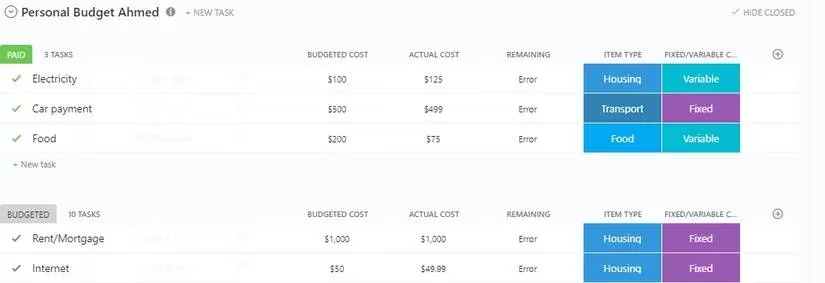
With inflation still on the rise in 2026, adopting beneficial personal finance habits is more important than ever. The number one habit is budgeting, and ClickUp's personal budget template makes it convenient. Unlike a static Excel sheet, this template offers easy customization and multiple views. Jordan uses it to visualize spending habits, cut unnecessary expenses, and plan for debt repayment and early retirement.
The template includes two default statuses—paid and budgeted—but Jordan added more as needed. Adding budget items is as simple as clicking the new task option. When Jordan paid the electricity bill, changing its status from pending to paid automatically moved it into the paid group. Pre-built columns like due dates, priority, and item type (grocery, travel, work) keep everything sorted, and views such as budget by category and calendar offer different perspectives. Jordan finally feels in control of finances.
⏱️ Services Timesheet: Freelance Hours Under Control
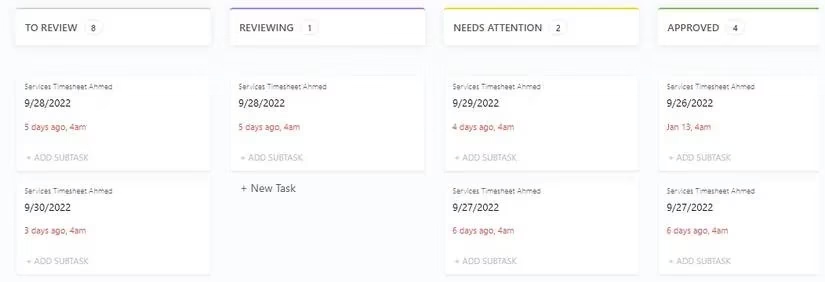
Jordan also runs a small freelance consulting gig on the side. The services timesheet template has become a handy tool for logging working hours and categorizing them by project or client. It tracks real-time progress and manages time effectively. Default views include a daily timesheet log form, employee summary list, weekly breakdown table, and monthly breakdown table.
Here is how Jordan uses it: each day, Jordan fills in the daily timesheet log form with date, name, hours worked, and hourly rate. The project manager (or Jordan, in this case) reviews the entries in the employee summary list and changes statuses as needed—approved, reviewing, on hold. In the board view, entries are grouped by status and can be dragged and dropped between groups. One of the most useful features is automatic pay calculation based on hourly rate and total hours. If the rate or hours change, the total pay updates automatically, saving Jordan from manual math.
🧠 Getting Things Done (GTD): Clearing Mental Clutter
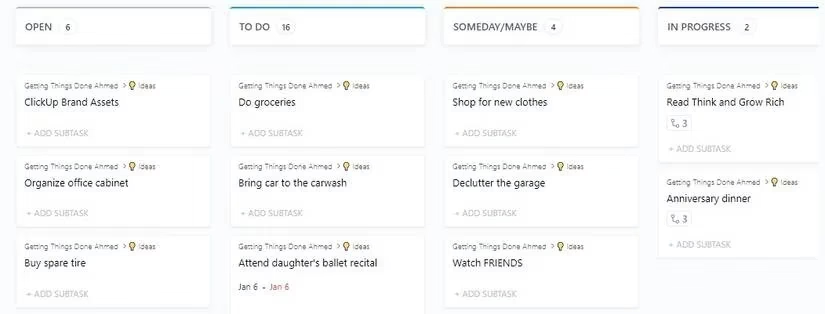
Finally, Jordan adopted the Getting Things Done template, based on David Allen's GTD framework. At its core, it is a simple to-do list, but much more useful. It frees up mental clutter by capturing everything on the mind into a list. All mental clutter goes into the "in list" or open category. Jordan then reviews each entry. If an item is actionable, it moves to the to-do category, where it can be further sorted using statuses like do it now or next action. The board view shows entries sorted by their relevant category, giving Jordan a clear overview of what needs attention.
📋 A Quick Reference Table
| Template | Best For | Key Views |
|---|---|---|
| Agile Project Management | Complex work projects with phases | List, board, timeline, calendar |
| Schedule Blocking | Daily time management | Activities, form, calendar |
| Personal Budget | Financial planning and tracking | Budget by category, calendar |
| Services Timesheet | Freelancers and service businesses | Form, summary list, weekly/monthly tables, board |
| Getting Things Done | Mental clarity and task capture | Open list, to-do, board |
ClickUp templates come with designated Getting Started Guides to ease users into the process. Jordan made sure to go through the guide before using each template, which helped grasp its various features. Once comfortable, Jordan customized the templates to better suit personal needs. While ClickUp is great for managing both personal and work projects, Jordan discovered it can be used for a lot more—from planning a family vacation to tracking home renovation milestones. In 2026, with life moving faster than ever, ClickUp templates offer a structured yet flexible path to productivity and peace of mind. ✅
Comments