Let's be honest, trying to remember every single word your professor said while you were simultaneously daydreaming about lunch is a losing battle. In 2026, the student's arsenal has evolved far beyond the trusty pen and paper (or the frantic, blurry phone photo of the whiteboard). The right digital note-taking app can be the difference between organized academic glory and a chaotic, last-minute cram session fueled by panic and questionable energy drinks. This guide dives into the best apps to transform your study habits from scattered to stellar.

The Tried-and-True Titan: Evernote
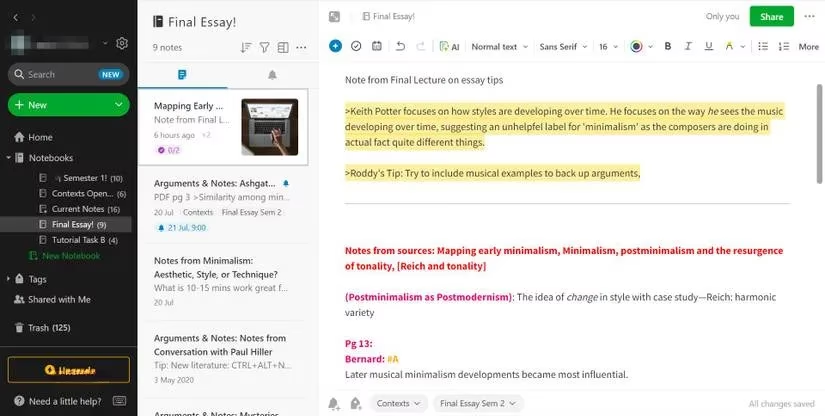
For students who want their digital notes to look as polished as a pre-med's lab coat, Evernote remains a heavyweight champion. It takes the chaos of class notes and imposes beautiful, searchable order. Think of it as a digital binder on steroids.
-
Organization Nation: Create notebooks for each class and group them into stacks. Finding that one note from three weeks ago? The shortcuts tab has your back.
-
Style Points: Its rich text editor lets you play with fonts and colors. Highlight key terms until they glow with the importance you wish you'd given them during the lecture.
-
Creative Flair: The Edit and Annotate feature is a game-changer for diagram-heavy subjects. Add arrows, shapes, and text directly onto images from your textbook or slides. Feeling artistic? The Sketch tool lets you attach your own masterpieces (or crude doodles) right into your notes.
The Collaboration King: Google Docs
When a group project looms, a silent dread fills the student body. Enter Google Docs, the app that makes collaborative suffering slightly less painful. Its deep integration with the Google ecosystem makes it a no-brainer for many.
Its essay-writing toolkit is robust, featuring word counts, spell check, and even a built-in citation helper (your future bibliography thanks you). Formatting is a breeze with headers, footers, and customizable spacing.
The real magic, however, is in the Share button. You and your classmates can edit the same document in real-time, watching each other's cursors dance across the page. The comment feature lets you tag teammates with questions or brilliant insights, simulating actual communication without the need for an awkward meeting.
The Brain-Building Powerhouse: RemNote
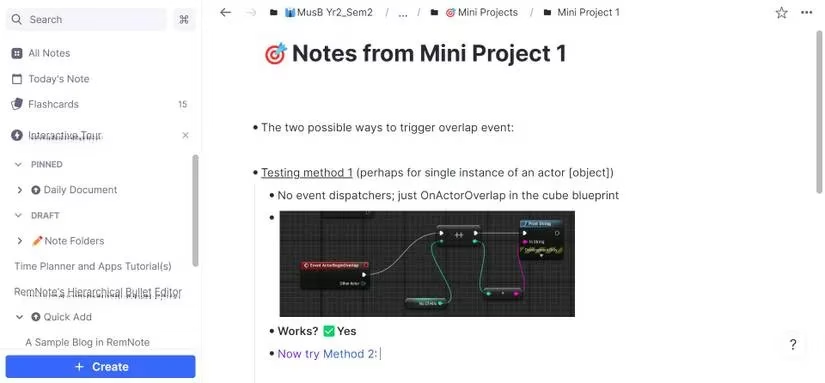
If your goal is to not just take notes but to actually understand and remember the material, RemNote might feel like you've downloaded a superpower. It's built on the concept of connecting ideas in a tree-like structure, mimicking how knowledge actually builds in your brain.
-
Multitasking Master: Open multiple notes side-by-side in panes. No more frantic alt-tabbing between the lecture on cellular respiration and your half-written summary.
-
Flashcard Fusion: This is where RemNote shines for students. Create flashcards directly within your notes. A dedicated tab then uses spaced repetition to quiz you, actively forcing recall. You can even rate your confidence on each card, and the app intelligently focuses on your weak spots. It's like a personal study coach that lives in your notes.
The Limitless Organizer: Notion
Notion is the Swiss Army knife of note-taking apps. It can be as simple or as complex as you need it to be, making it ideal for the student who wants to organize their entire academic life in one place. Its clean, block-based editor is incredibly fast.
Terrified of a blank page? Notion's template gallery is a lifesaver. They even offer a free "Class Notes" template that gives you a perfect starting structure. The block system lets you drag and drop text, to-do lists, media, and more with ease. For highlighting crucial info, the Callout block makes key points impossible to miss.
The Digital Whiteboard: Microsoft OneNote
For the visual learner or the student who thinks best by scribbling, OneNote offers a uniquely free-form canvas. It feels less like a document and more like an infinite, digital notebook where you can click anywhere and start writing, drawing, or pasting.
-
Mind Mapping Marvel: Drag text and images around to create connections visually, perfect for brainstorming essay topics or understanding complex theories.
-
Beyond Text: Attach audio recordings of lectures that sync with your notes. Math and science students, rejoice: the Ink to Math feature lets you draw an equation and watch it transform into neat, typed text.
The Focused Minimalist: Joplin
In a world of endless notifications, Joplin is a sanctuary of focus. This open-source app provides a distraction-free environment for deep work. Notes are organized in a simple, nested folder tree on the sidebar—create as many as your heart desires.
Its formatting ribbon packs a punch for student needs: insert quotes, web links, and PDFs. For the coding students, it supports code blocks beautifully. A standout feature is its robust Markdown support, allowing you to write with simple, fast syntax and toggle to a rich-text preview instantly.
The Connected Thinker's Tool: Logseq
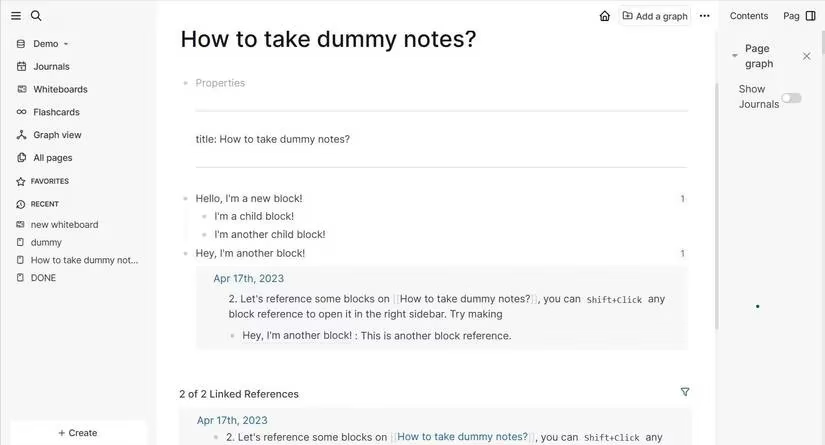
Logseq is for the student who sees connections everywhere. It's more than a note-taker; it's a knowledge-management system. It features a daily journal, a whiteboard, and built-in flashcards, making it a uniquely comprehensive study suite.
The whiteboard tool lets you build diagrams and, impressively, embed entire existing note pages within them to edit on the fly. Its core philosophy revolves around bidirectional linking. With a simple command, you can link related concepts across different notes. Clicking these links allows you to navigate your web of knowledge seamlessly, helping you build a deeper understanding of how topics interrelate.
Choosing Your Digital Sidekick
So, which app is the one? It depends on your brain's operating system.
| Your Study Style | Recommended App | Why It's a Match |
|---|---|---|
| The Organized Perfectionist | Evernote | Polished notes, powerful search, and annotation tools. |
| The Team Player | Google Docs | Seamless, real-time collaboration is unbeatable. |
| The Active Learner | RemNote | Integrated flashcards and spaced repetition for deep memory. |
| The Project Manager | Notion | Organize notes, tasks, and your entire life in one flexible space. |
| The Visual Scribbler | Microsoft OneNote | Infinite canvas for free-form notes, sketches, and mind maps. |
| The Focus Seeker | Joplin | Distraction-free, Markdown-friendly, and deeply customizable. |
| The Connective Thinker | Logseq | Links ideas across a personal knowledge graph with whiteboards & journals. |
In 2026, there's no excuse for lost notes or pre-exam confusion. These apps are more than digital notebooks; they're force multipliers for your brain. Whether you're typing, drawing, linking, or collaborating, the right tool can upgrade your learning from a chore to a superpower. Now go forth, take magnificent notes, and ace those exams! 🚀
Comments