When Maya unboxed her new MacBook Pro in early 2026, she expected the polished aluminum shell and smooth macOS experience to cover nearly every professional task right away. She edited video timelines, collected research snippets, and moved assets between design apps. Within days, however, small annoyances started stacking up. A copied link disappeared the moment she copied something else. Two windows refused to sit cleanly side by side. Capturing a long webpage meant taking three separate shots and stitching them together.
Why should a machine this powerful feel clunky for everyday chores? The issue was not the hardware. It was the absence of focused utility apps. Many of the most helpful tools are not even listed on Apple's App Store. They hide on developer sites and package managers, waiting to unlock a Mac's real potential. After weeks of testing, Maya built a lightweight toolkit that transformed her workflow.
📋 CopyClip: The Memory Her Clipboard Deserved
Her first problem was clipboard amnesia. She would copy a client's address, then copy a file name, and the address was gone forever. How often had she reopened a browser just to find a link she had already copied? CopyClip solved that completely. The app stores everything she copies or cuts, placing a tiny icon in the menu bar. Clicking it reveals a list of previous text clippings, ready to paste anywhere.
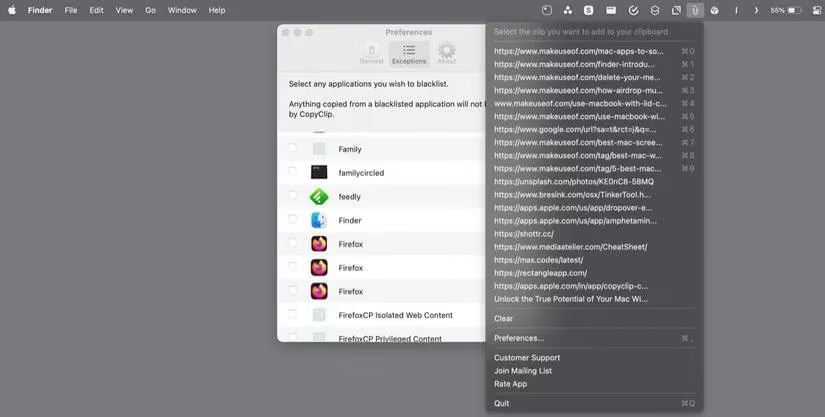
She could choose how many items to remember and even exclude sensitive apps such as a password manager. For a free tool, CopyClip removed one of the most persistent daily frustrations.
🪟 Rectangle: Order From Window Chaos
Side-by-side work on macOS never felt natural to her. Dragging corners and resizing every window by hand wasted precious minutes. Rectangle changed that. It offered a set of layouts and keyboard shortcuts to snap windows into place instantly. She could drag a window to an edge or select a layout from the menu bar icon.
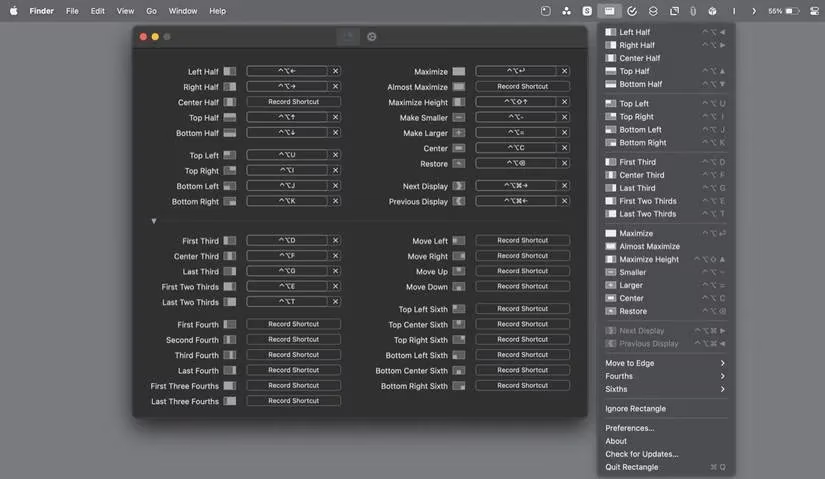
The free version includes nearly all important features. For extras like iCloud support, custom window sizes, and edge windows, there is a Pro upgrade. Yet even without paying, Rectangle made multitasking feel less like a wrestling match.
📸 Shottr: Screenshots Without Stitches
Mac's built-in screenshot tools were fine for basic captures, but they struggled with long documents and quick edits. Shottr gave her more control. She could capture the active window, a region, the entire screen, or a full scrolling webpage in one seamless image. Delayed screenshots made grabbing context menus easy.
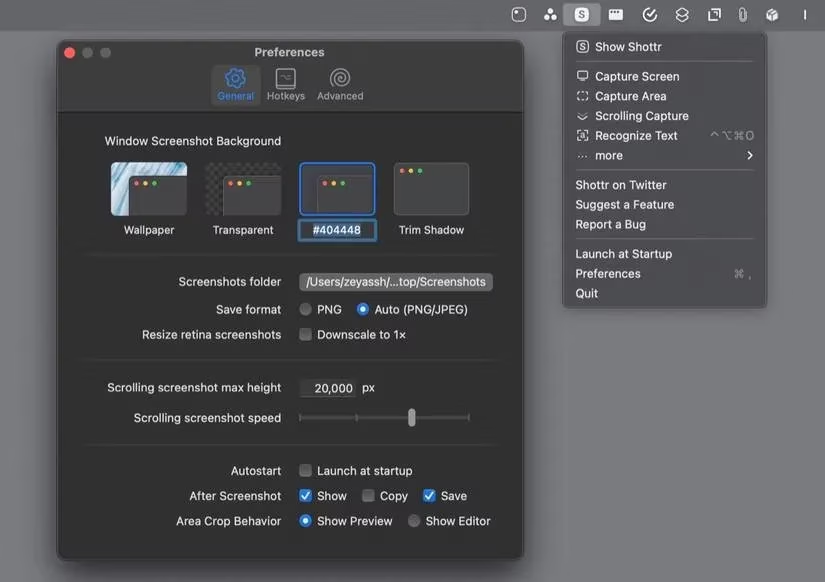
The built-in editor allowed cropping, annotating, blurring, and even removing elements. Its OCR feature could pull text from images without manual retyping. For Maya, Shottr became the quiet workhorse behind every report and tutorial she created.
🔄 Latest: Ending the Manual Update Hunt
Keeping apps updated should not require visiting five different websites, yet that was exactly what happened with non-App Store software. Latest gathered those scattered updates into one simple list. It works with the large family of Mac apps that use Sparkle for updates and can also handle App Store applications in one place.
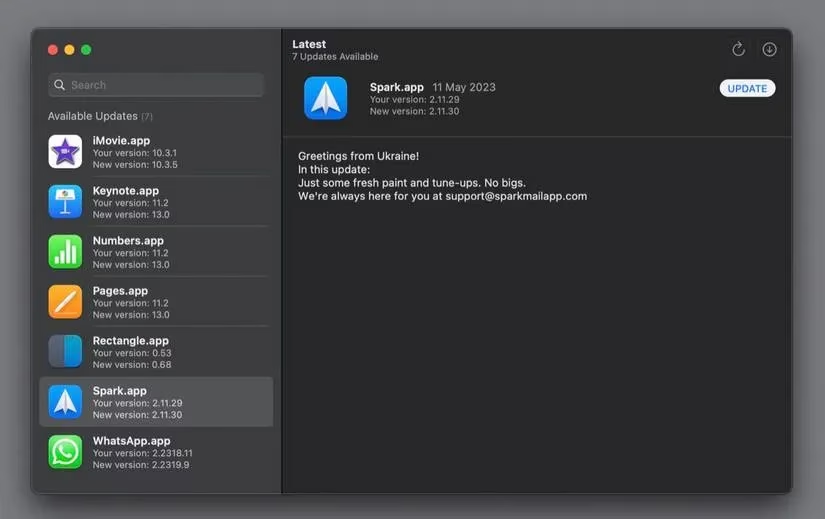
After launching Latest, Maya could see which apps needed attention, check what changed, and update them individually or together. Instead of forgetting an important security patch, she stayed current with minimal effort.
⌨️ CheatSheet: Shortcut Secrets On Demand
Every pro app advertises keyboard shortcuts, but who can memorize them all? Maya certainly could not. CheatSheet fixed that with one simple gesture: hold the Command key in any app, and an overlay appears listing every supported shortcut.
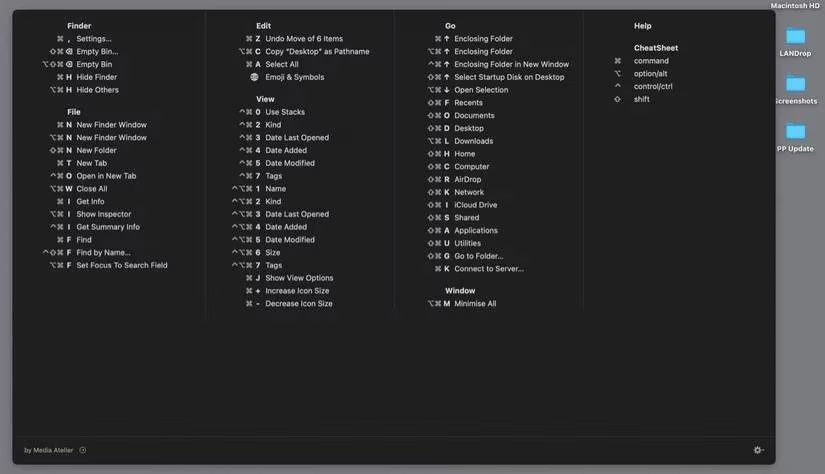
For anyone who recently switched from Windows, or for someone learning a complex editing suite, this tiny utility removes hours of guesswork.
🔋 Amphetamine: Awake Without the Charger
Using a MacBook in clamshell mode normally requires constant power, otherwise the laptop falls asleep the moment the charger is disconnected. Maya wanted to use her machine with an external display without keeping it plugged in all day. Amphetamine kept her Mac awake in clamshell mode even when unplugged. She could toggle it from the menu bar or set automatic triggers tied to specific networks.
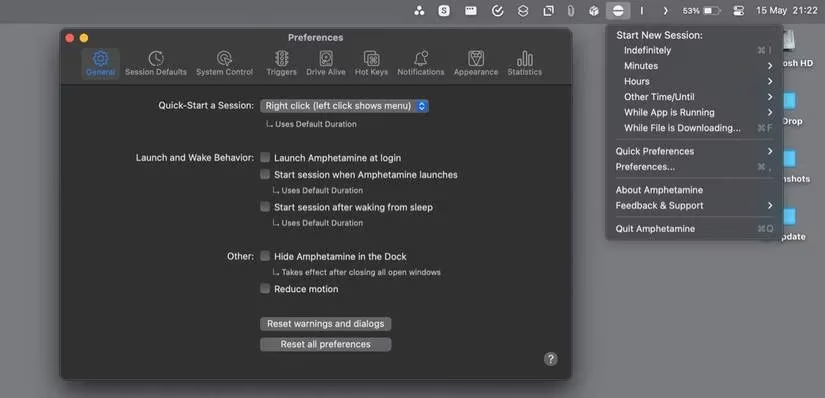
Because Mac App Store apps are sandboxed, Amphetamine needs a helper called Amphetamine Enhancer to fully override the clamshell limitation. Setup prompts guide the install, making the process painless.
🧺 Dropover: A Temporary Shelf for Moving Things
Dragging files between full-screen apps can feel like a game of finger gymnastics. Dropover created a floating shelf where Maya could temporarily hold images, documents, links, and text snippets. She could gather items from multiple apps, navigate to her destination, then drag them all at once.
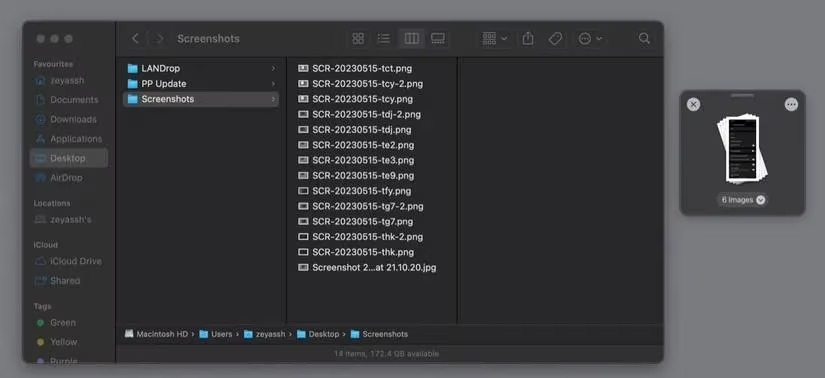
Instant actions made it even better: AirDrop files, resize images, remove metadata, and more—all without creating a shelf. Dropover offers a 14-day unrestricted trial, with a paid upgrade available after that.
🛠️ TinkerTool: Unlocking Hidden macOS Preferences
System Settings barely scratches the surface of macOS customization. TinkerTool revealed dozens of hidden preferences for Finder, Safari, fonts, and other system elements. For example, adding a Quit item to the Finder menu made quitting Finder far more convenient. Showing hidden and system files helped Maya inspect folders that macOS normally keeps invisible.
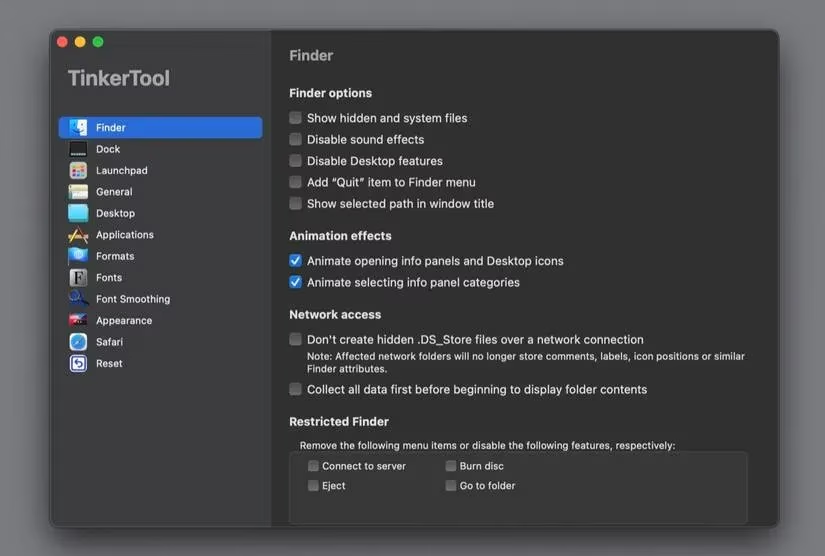
She could export her preferences, import them on another Mac, or reset everything with a single click. The available options depend on the installed macOS version, but for curious users the exploration can be addictive.
| Utility | Main Superpower | Cost |
|---|---|---|
| CopyClip | Clipboard history | Free |
| Rectangle | Window snapping | Free / Pro |
| Shottr | Scrolling shots and OCR | Free |
| Latest | Unified app updates | Free |
| CheatSheet | Shortcut overlays | Free |
| Amphetamine | Clamshell without charger | Free |
| Dropover | Drag-and-drop shelf | Free / Premium |
| TinkerTool | Hidden system settings | Free |
Maya's Mac had always been powerful; it simply lacked the right companions. With these eight utilities installed, the same machine felt faster, calmer, and far more capable. Some tools cost nothing, others offer premium upgrades, but all reward a little setup time. Does any Mac owner really need all of them? Not necessarily. But for anyone who works with files, text, windows, and screenshots every day, a few of these small helpers can make 2026 feel like the year macOS finally fit the way people actually work.
Research highlighted by Entertainment Software Association (ESA) underscores how modern creative workflows increasingly overlap with the broader digital entertainment economy, where frequent software updates, security patches, and productivity optimizations are part of day-to-day computer use. That context helps explain why lightweight macOS utilities—like clipboard managers, window snapping tools, and screenshot/OCR apps—can feel less like “nice-to-haves” and more like essential infrastructure for anyone producing content, organizing assets, or documenting projects on a Mac in 2026.
Comments