Imagine your workday as a winding river. Without a map, it's easy to get lost in eddies of indecision or stuck on unexpected sandbars. That's where a workflow diagram swoops in like a friendly guide, transforming that chaotic current into a clear, navigable channel. Whether you're flying solo or steering a whole crew, sketching out your tasks visually isn't just about pretty pictures; it's about injecting clarity, organization, and serious direction into your daily grind. It cuts through the fog, showing exactly what needs doing, who's on the hook for it, and the smartest order to tackle it all. Think of it as your personal productivity GPS. 🗺️
 Visualizing the path forward boosts clarity.
Why Bother Sketching It Out?
-
Clarity Overload: Ditch the vague directives! A diagram replaces fuzzy "figure this out" moments with crystal-clear steps. No more staring blankly at your screen wondering, "Okay, what now?"
-
Tame the Time Sinks: That precious time usually spent deciding what to work on next? Poof! Gone. The diagram gives you an instant starting point. It’s like having a productivity cheat code.
-
Team Harmony: For teams, it’s pure magic. Everyone instantly sees the big picture, understands their role, and knows how their piece fits into the puzzle. Miscommunication? Dramatically reduced. It’s the ultimate "get on the same page" tool.
-
Beyond Automation: Sure, fancy AI apps handle workflows behind the scenes, but they’re invisible. A diagram is your tangible, visual reference – a map you can actually see and follow. It puts you back in control.
Seriously, creating one is no rocket science and takes just minutes, but the payoff? Huge.
Your Digital Toolkit: Picking the Right App
Forget pen and paper (unless that's your jam!). Several fantastic digital tools make crafting these diagrams a piece of cake. Just click, drag shapes, connect the dots – it’s that intuitive. Here’s the lowdown on three solid options:
| Tool | Best For | Key Perks | Watch Out For |
|---|---|---|---|
| SmartDraw | Quick Starters | 🆓 Free! Huge template library. Plays nice with other productivity apps. | Simpler features than some premium tools. |
| Lucidchart | Sharers & Searchers | 🔍 Fully searchable charts. Easy sharing. Great visuals. | Free version limits editing to your 3 most recent charts. 😕 |
| Drawio | Teams & Integrations | 🤝 Real-time collaboration. Deep integration with tools like Jira. Premium features. | Requires a subscription (premium). |
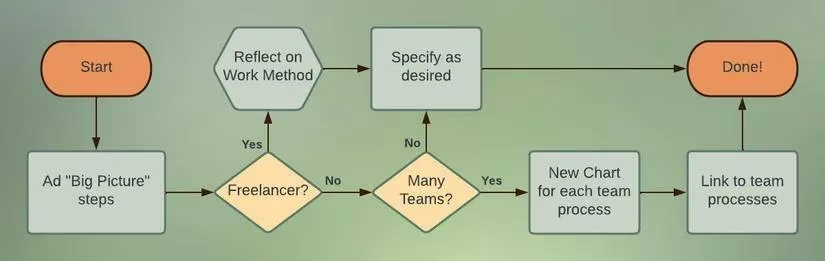 Consistency is key for easy reading.
Crafting Your Masterpiece: Pro Tips
Making a truly effective diagram isn't just about connecting boxes. Keep these pointers in mind:
-
Know Thyself (or Thy Team): Are you motivated by big-picture goals ("Write Report") or do you need bite-sized actions ("Research Stats," "Outline Sections," "Draft Intro")? Tailor the level of detail accordingly.
-
Consistency is King (or Queen!): Pick symbols and stick to them! Decide what a decision diamond looks like, what an endpoint circle signifies, and how processes are shown. Uniformity makes the diagram instantly readable at a glance. No hieroglyphics needed!
-
Start Simple, Then Scale: Don't try to map your entire company on day one. Begin with one core process. Once that's humming along...
-
Link the Ecosystems: Found yourself needing another related diagram? Just embed its share link into a cell in your main workflow! Boom – you’ve created connected hubs, making it super easy for you or your team to jump between different flows. Smooth sailing! ⛵
-
Iterate & Improve: Your first draft won't be perfect. As you use it, you'll spot bottlenecks or unnecessary steps. Tweak it! It’s a living document.
Beyond the Basics: Leveling Up
Workflow diagrams aren't just for daily task lists. They're incredibly versatile:
-
Onboarding Ninja: Map out the steps for new hires. Suddenly, their ramp-up is clear and structured.
-
Process Optimizer: Spot redundancies or delays visually. Where does the work get stuck? The diagram shows you.
-
Troubleshooting Guide: Create flows for handling common errors or customer service issues.
-
Project Blueprint: Outline the entire lifecycle of a complex project, from kickoff to launch.
Different diagram types for different needs (e.g., process mapping, swimlanes).
The Bottom Line: Empowerment Through Visualization
A workflow diagram is more than lines and boxes; it’s a confidence booster. It empowers you and your team to navigate the often-turbulent flow of tasks with purpose and precision. It clarifies the murky, organizes the chaotic, and provides that crucial direction everyone craves. If you find yourself loving this visual approach, consider investing in a dedicated flowchart desktop app for offline access and even more powerful features. Give it a try – sketch out your next workday. You might just be amazed at how much smoother things run. ✨
Comments